Deceptive Communication
How messages and content lie to you - and one process that works against all of them.
The Email That Looked Exactly Right
Rajan managed accounts for a mid-sized company in Pune.
One Tuesday morning, an email arrived from his CEO. The display name, the signature, the tone - all correct. The subject line read: "Urgent wire - needs to go today." The message explained that a new supplier deal was closing and required a same-day transfer. It asked him not to discuss it with others until the deal was confirmed.
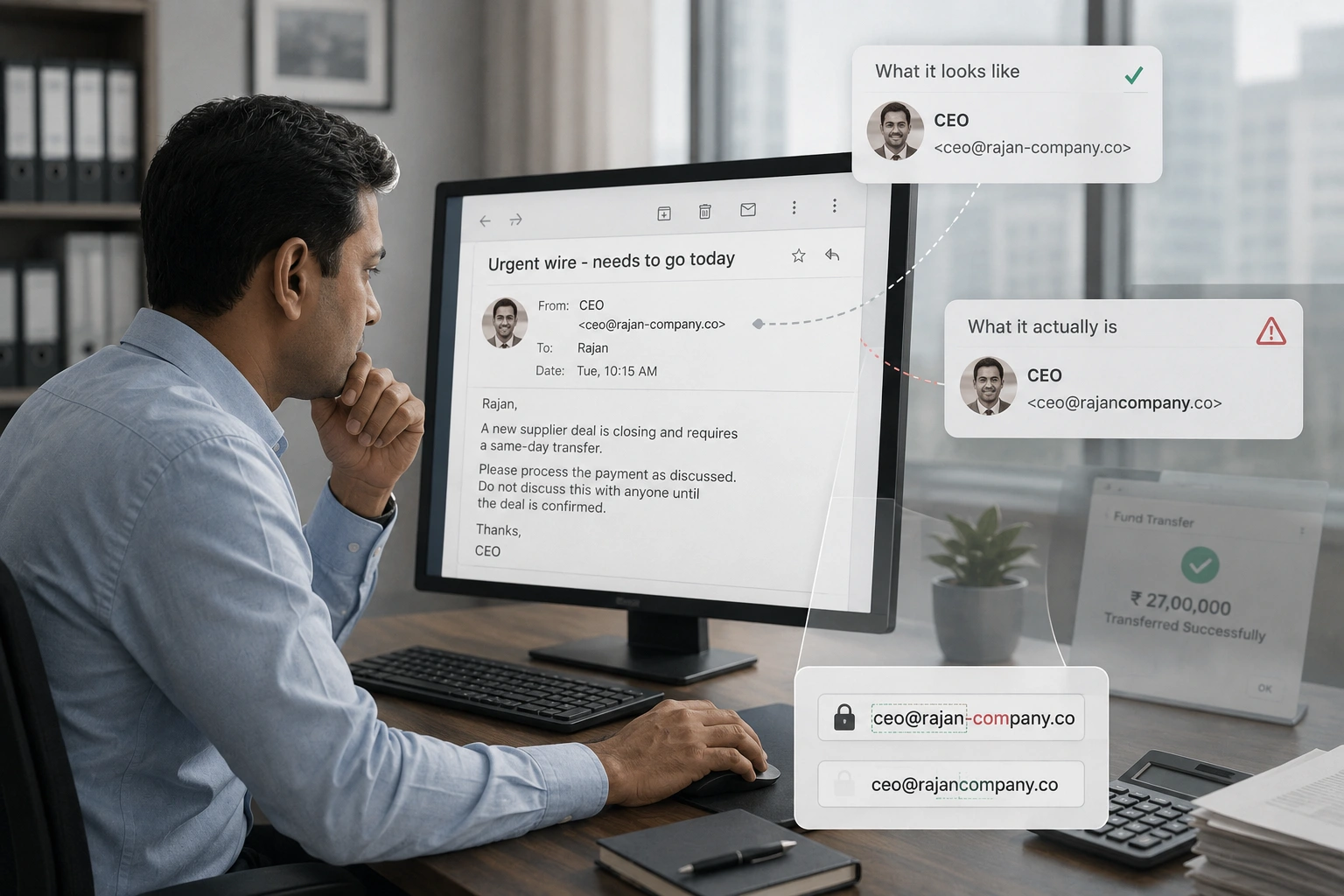
Rajan had processed transfers on request before. He had worked with this CEO for four years. He recognised the writing style. He did not notice that the email address was ceo@rajan-company.co instead of ceo@rajancompany.co - one hyphen that changed everything.
He transferred ₹27 lakh.
He found out two hours later when he mentioned it to a colleague. The real CEO had sent no such email. The account was spoofed. The money was gone.
The email looked exactly right because it was designed to. The only flaw was in a part most people never look at.
What Is Actually Happening: The Formats Are Different. The Method Is the Same.
Deceptive communication arrives in six formats: email, SMS, voice calls, websites, QR codes, and media content. Each looks different. Each exploits the same thing.
We trust what is familiar. A recognised name, a known logo, an expected format - each of these creates a moment of reduced scrutiny. Deceptive communication is designed to fit inside that moment before scepticism has time to engage.
4.7 billion
phishing emails are sent every single day.
That is more than half the world's population, daily. The volume alone means even a very low success rate produces millions of victims.
Source: SlashNext Annual Phishing Intelligence Report, 2026$3.1 Billion Lost to CEO Fraud Annually
Business email compromise - where attackers impersonate executives to authorise wire transfers - cost organisations $3.1 billion in 2024. The average loss per incident exceeded $137,000. Most victims noticed nothing wrong until the transfer had cleared.
A 40x Rise in Deepfake Fraud Since 2022
Deepfake fraud incidents increased 40-fold between 2022 and 2025. In one documented case, a finance employee in Hong Kong transferred $25 million after a video call with deepfake versions of the company's CFO and colleagues - none of whom were real.
87% of Phishing Sites Now Use HTTPS
The padlock icon means a connection is encrypted. It does not mean the site is legitimate. 87% of phishing websites now display a padlock. Treating HTTPS as a safety signal is one of the most widespread and exploited misconceptions in digital security.
False News Travels Six Times Faster Than True News
A landmark MIT study found that false information spreads six times faster than accurate information on social media. The mechanism is emotional: false stories are more novel and more outrage-inducing, which drives shares. Accuracy rarely competes with emotional resonance for reach.
Now Try It in Real Time
The tool below works as a practice exercise - and as a real-time reference you can return to the next time something feels off.
Select the format you received. The kit walks you through 4 verification steps built specifically for that communication type. At the end, it generates a checklist you can save and use.
Select each format once. The scenarios and checklists are different for every type.
What That Just Showed You
1. The display name and the actual address are different things.
Rajan saw the right name. He did not check the actual sending address. In every email client, the display name is a free-text field that anyone can set to anything. The only reliable part of an email's origin is the domain after the @ symbol. One character changed in that domain is enough to send the message to a completely different server - and a completely different person.
2. The padlock does not mean safe. It means encrypted.
HTTPS tells you that the connection between your browser and the server is encrypted. It says nothing about who operates the server. A criminal can acquire an SSL certificate for a fake site in minutes. Checking HTTPS is not a verification step. Checking the exact domain name is.
3. Every format has one weak point that is always the same.
For email: the domain. For SMS: the sender ID or number. For calls: who initiated it and whether you can hang up to verify. For websites: the domain. For QR codes: who placed it there. For social media: account age and verification status. Each format has a different surface, but the same underlying question: can I confirm the source through a channel I already trust, independently of the one I am looking at?
4. Urgency is a mechanism, not a fact.
"Your account will be suspended in 24 hours." "The offer expires in one hour." "Do not discuss this with anyone until it is done." These are not descriptions of real deadlines. They are instructions to prevent verification. Any communication that creates pressure not to pause is a communication that cannot survive verification. That is why the pressure is there.
5. Deepfakes have changed the threshold for trusting what you see and hear.
A voice call from a family member's real number. A video call with a familiar face. These were once reliable signals. They are no longer sufficient on their own. Verification now requires an independently confirmed contact - a message sent to a number you saved, a call placed through a channel you initiated, a check through the official app. The content of a communication is no longer proof of its source.
Three Things Worth Doing
1. Look at the actual address, not just the name.
For every email that asks you to take an action, hover over or tap the sender name to reveal the actual email address. Check the domain - the part after the @ symbol - against what you know the real domain to be. Do this once for every unusual email until it becomes automatic. It takes four seconds and it breaks the most common format of CEO fraud, bank phishing, and credential harvesting.
2. Make verification a separate step from response.
When a message or call requests action - any action involving money, credentials, or personal information - treat verification and response as two separate events. Respond only after you have confirmed the source through a channel you initiated independently. This does not need to take long. A 90-second check is enough to break most deceptive communications.
3. Teach one person in your household the padlock fact.
The HTTPS padlock misconception is one of the most widely shared and most consequential false beliefs in everyday digital safety. Most people believe the padlock means a site is safe. Find one person in your household or immediate network and explain the distinction this week. That conversation has a measurable effect on the people around you.
One Question Before You Continue
Rajan received an email with his CEO's name as the sender, the correct signature, and a familiar writing style. He transferred ₹27 lakh. What was the single thing he did not check that would have revealed the fraud?