Helplessness & Overwhelm
Before a scammer can take your money, they need to take your ability to think clearly. The fastest way to do that is panic. A screen full of warnings, a blaring alarm, a confident voice offering the only solution - all of it is engineered to make you stop questioning and start obeying.
When Panic Takes Over
Rohan was checking emails when a warning appeared on his laptop.
"Your device has been compromised. Immediate action required. Your banking data is being accessed right now."
Within seconds, the screen filled with overlapping alerts, error messages, and technical jargon he did not understand. A siren sound began playing. His mind went blank.
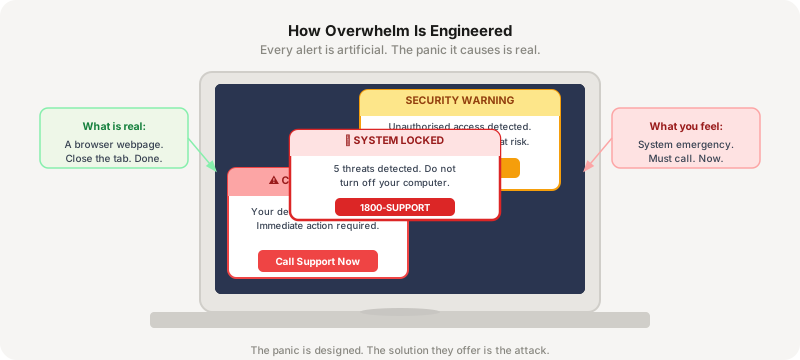
A support number appeared on the screen. Feeling panicked and confused, Rohan called it immediately.
"Don't worry, sir. We will fix everything for you."
The voice sounded confident. Rohan felt relieved. He followed every instruction without hesitation.
Only later did he realise he had given a scammer full remote access to his computer and his bank login.
When people feel overwhelmed, they stop questioning and start trusting whoever seems to have the solution. That is exactly what attackers count on.
What Is Actually Happening: Helplessness Is Manufactured
Overwhelm is a physiological state. When hit with sudden high-stress stimulation, the brain shifts from logical processing to survival mode. Social engineers deliberately trigger this state because a panicked mind cannot evaluate risk or notice inconsistencies.
$1.1B
lost to tech support scams in the US in 2024 - the most costly impersonation fraud category, driven almost entirely by manufactured panic.
Every alert, every siren, every jargon-filled warning was designed in a scam compound. None of it was real.
Source: FTC Consumer Sentinel Network Data Book, 2025Highest Loss Group
Adults over 60 file more tech support fraud complaints than any other age group and lose an average of $14,000 per incident. Non-technical users are disproportionately targeted.
Overload Disables Logic
Loud audio alerts and rapid flashing visuals drastically reduce decision-making quality. Attackers use sensory overload to simulate a physical crisis and force immediate compliance.
4x Re-targeting Rate
Individuals who have been scammed once are up to 4x more likely to be targeted again by recovery scammers within 180 days. Being a victim makes you a higher-value target, not a protected one.
One Refusal Is Enough
Knowing that no browser alert can damage your device or access your accounts eliminates the only lever tech support scams have. A single piece of accurate knowledge breaks the entire attack.
Learned Helplessness: When Giving Up Feels Like the Only Option
Learned helplessness happens when someone faces so many warnings, obstacles, and errors that they begin to believe nothing they do will help. Scammers create this state deliberately: fake alerts stack on top of each other, jargon is layered in, and the problem appears to grow no matter what the victim tries.
Once users feel powerless, trusting someone else to take control becomes the path of least resistance. The attack succeeds not when the user is deceived - it succeeds when the user stops believing they can handle the situation themselves.
Technical Overwhelm: Complexity as a Submission Tool
If a scammer tells you "your computer has a virus," you might ask for proof. If they tell you "your dynamic heap allocation has experienced a critical buffer overflow bypassing the ring-0 kernel architecture," your brain likely glazes over.
Jargon creates a power imbalance. By framing a browser popup as a catastrophic system failure using language you cannot parse, the attacker transforms themselves into the only person who can fix it. You are not being deceived about the facts - you are being made to feel unqualified to evaluate them.
Creating Dependence: Becoming the Only Solution
Many tech support scams follow the same arc: first create the emergency, then appear as the only solution.
After overwhelming the user with warnings, the scammer steps in as the person who can fix everything. Relieved to find help, the victim follows instructions without questioning them. This is not a coincidence. The emergency and the helper were built by the same hand.
Post-Breach Paralysis and Recovery Scams
Scammers frequently target people who have already lost money in a previous scam. They contact victims claiming to recover lost funds, restore accounts, or track down criminals - for a fee.
Desperate for a solution, victims may trust these promises and lose even more. The recovery scam works because it exploits hope, urgency, and the desire to undo a mistake. If someone contacts you offering to recover your losses, treat it as a second attack.
Try It: The Overwhelm Check
What That Just Showed You
1. Browser alerts cannot damage your device or access your accounts. No matter how many red boxes flash or sirens play, an uninvited web page cannot destroy your machine. The chaos is cosmetic. Close the browser tab and it is gone.
2. Legitimacy never requires a hidden lane. Microsoft, Apple, Google, and your bank will never drop an uncloseable window demanding an immediate call to an unknown number. A support number appearing inside a panic alert is always the payload.
3. The helper who brought the storm is always the attacker. If the same alert that frightened you also presents an immediate phone number or download link to solve the problem, the emergency and the solution were created by the same person.
4. Recovery offers from strangers are second attacks. No third party can recover funds from a completed scam without going through official channels you can verify independently. Anyone who contacts you first is not here to help.
Four Things Worth Doing
1. Disconnect the internet connection first. The moment your screen fills with terrifying alerts, disconnect from Wi-Fi or pull the ethernet cable. Without a network line, remote attackers cannot pull data or maintain access.
2. Force-close the browser with the physical power button if needed. If the browser locks up, hold the device's physical power button for 5-10 seconds until the machine shuts down completely. The malicious script leaves with it.
3. Never use phone numbers or links displayed inside a panic warning. Look up any organisation's support portal directly on an independent, trusted device - not through anything on the alert screen.
4. Identify a trusted technical contact in advance. A calm third party, a family member with technical knowledge, an IT department, or a reputable local repair shop can break the artificial urgency instantly. Speaking to someone you trust shatters the attacker's control.
One Question Before You Continue
Your screen suddenly fills with a loud siren and multiple warnings claiming your banking data is being corrupted. What is the safest immediate action?